

AI tools like Google AI Overviews, ChatGPT, and Perplexity are now deciding which websites are worth citing when they answer people’s questions. And it turns out the things that make them choose your site are the same things that have always made websites good: fast load times, clear structure, accessible design, and content that actually helps people.
Here are 10 UX best practices that pull double duty, backed by research from Google, Nielsen Norman Group, and Baymard Institute.
1. Make it fast
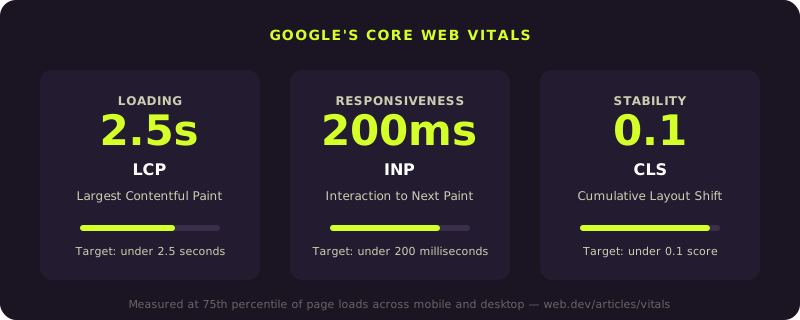
Google’s Core Web Vitals set the bar: your largest content element should load within 2.5 seconds (LCP), your page should respond to interactions within 200 milliseconds (INP), and your layout shouldn’t shift around while loading (CLS under 0.1).
These aren’t just performance targets. Google’s AI features use the same ranking systems as traditional search. If your site is slow, it’s less likely to be crawled, trusted, or cited. Optimize your images, cut unnecessary JavaScript, and test on real mobile connections. Speed is the foundation everything else is built on.
2. Design mobile-first
Over 60% of web traffic is mobile. Google indexes the mobile version of your site first. If your mobile experience is an afterthought, your desktop version doesn’t save you.
Baymard Institute’s 2025 mobile UX research found that a huge number of even major sites still get basic mobile navigation wrong. Start with the smallest screen and work up. Touch-friendly targets, readable text without pinching, and layouts that adapt cleanly. This isn’t a nice-to-have anymore.
3. Build a clear visual hierarchy
Nielsen Norman Group’s heuristic on “aesthetic and minimalist design” puts it simply: every extra piece of information on a page competes with the relevant pieces.
Use large, clear headlines. Put your most important call-to-action above the fold. Structure your content with proper heading levels (H1, H2, H3) so both readers and AI systems can follow the logic. Good hierarchy isn’t just a design preference. It’s how you make your content parseable by humans and algorithms at the same time.
4. Simplify navigation
Hick’s Law: more choices means slower decisions. Baymard’s navigation research found that 67% of mobile sites have mediocre-to-poor navigation. The fix is clear category structures, progressive disclosure, and menus that guide people instead of overwhelming them.
Clean navigation also makes your site easier to crawl. When search engines and AI tools can map your content structure clearly, they understand what each page is about and when to cite it.
5. Stick to familiar patterns
Jakob’s Law: users expect your site to work like the other sites they use. Navigation at the top, logo links to home, search icon is a magnifying glass, cart in the upper right. These patterns exist because they work.
When you break conventions for the sake of being different, you introduce friction. AI tools also benefit from standard patterns because they’ve been trained on millions of sites that follow them. Familiar structure equals easier processing equals better visibility.
6. Make it accessible
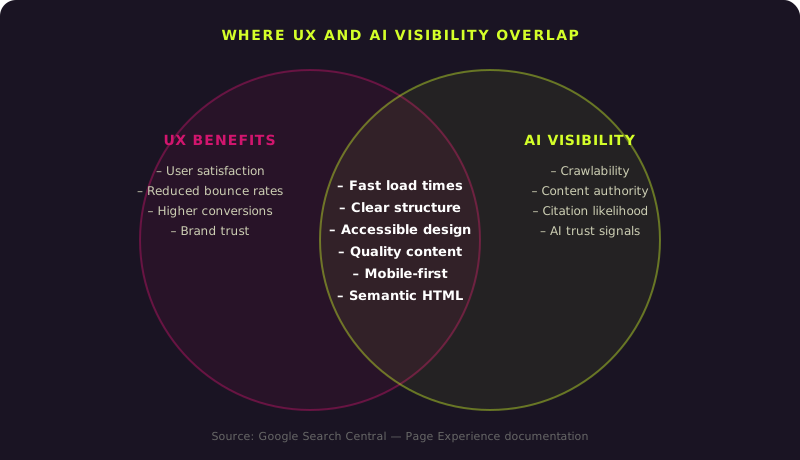
Accessible websites have better HTML structure, clearer heading hierarchies, more descriptive link text, and proper alt attributes on images. All of those things happen to be exactly what search engines and AI tools use to evaluate content.
WCAG compliance isn’t a direct ranking factor, but the technical work it requires overlaps almost entirely with what makes a site crawlable, indexable, and citable. Building for accessibility isn’t just the right thing to do. It’s the most efficient way to improve your site’s technical quality across the board.
7. Give users immediate feedback
NNG’s “visibility of system status” heuristic: people need to know their actions registered. Loading indicators, confirmation messages, inline form validation, button state changes. When users know what’s happening, they stay and complete their tasks.
Good feedback loops reduce bounce rates and improve engagement metrics. Those are exactly the kinds of user behavior signals that search engines factor into quality assessments. A site where people successfully complete their goals sends stronger signals than one where they leave confused.
8. Answer the question first
Google’s AI optimization guide says to create “non-commodity content” based on real expertise. From a UX perspective, that means every page should answer the visitor’s question as directly as possible.
Don’t save the good stuff for the end. State your answer early, then go deeper with context and examples. AI tools specifically look for content that provides clear, authoritative answers upfront. If your page takes 1,500 words to get to the point, a competitor’s page that answers in the first paragraph will get cited instead.
9. Prevent errors instead of apologizing for them
NNG’s “error prevention” heuristic: the best interfaces prevent problems before they happen. Smart defaults, clear labels, input constraints, confirmation dialogs before destructive actions.
Sites with fewer errors have better engagement metrics. Longer sessions, lower bounce rates, more completed conversions. Those behavioral signals matter to every system evaluating your site’s quality, including the AI tools deciding whether to cite your content.
10. Test with real people
The best UX decisions come from watching real users, not guessing. Analytics tell you what happened. Usability testing tells you why.
Baymard Institute’s research consistently finds significant usability gaps on sites that look well-designed on the surface. The only way to catch those gaps is to put your site in front of actual users and observe what happens. Regular testing keeps your site aligned with how people actually think and behave, which sends the strongest quality signals to every system evaluating it.
The bottom line
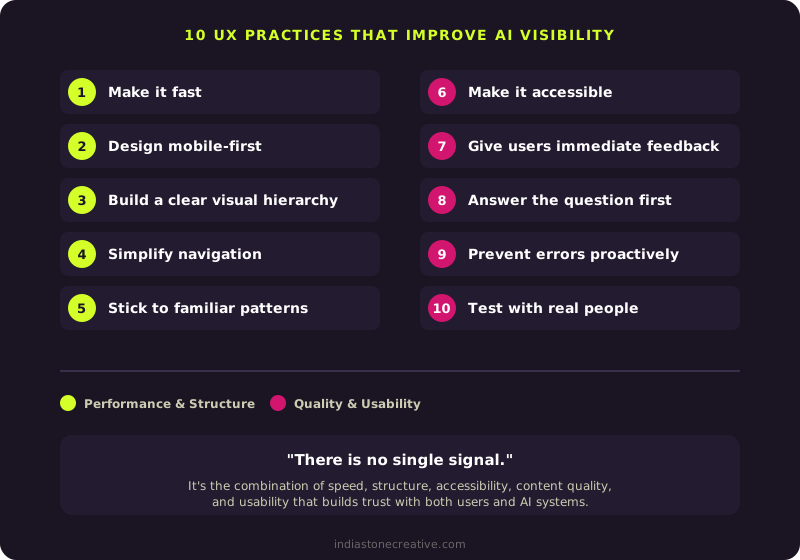
Google’s page experience documentation says it clearly: “There is no single signal.” It’s the combination of speed, structure, accessibility, content quality, and usability that builds trust with both users and AI systems.
Every UX improvement you make serves two audiences at once. Your visitors get a better experience. AI tools get a more trustworthy source to cite. That’s about as close to a free lunch as you’ll find in digital strategy.
Related reading
Sources
- Google. Core Web Vitals. Web.dev.
- Google. Understanding page experience in Google Search results. Google Search Central.
- Google. Optimizing for generative AI search. Google Search Central.
- Nielsen, J. 10 Usability Heuristics for User Interface Design. Nielsen Norman Group.
- Baymard Institute. Mobile UX Trends 2025. Baymard Institute.
- Baymard Institute. Homepage and Category Navigation UX 2025. Baymard Institute.
Want help putting these UX practices into action on your website? Learn more about our UX design services, or get in touch.